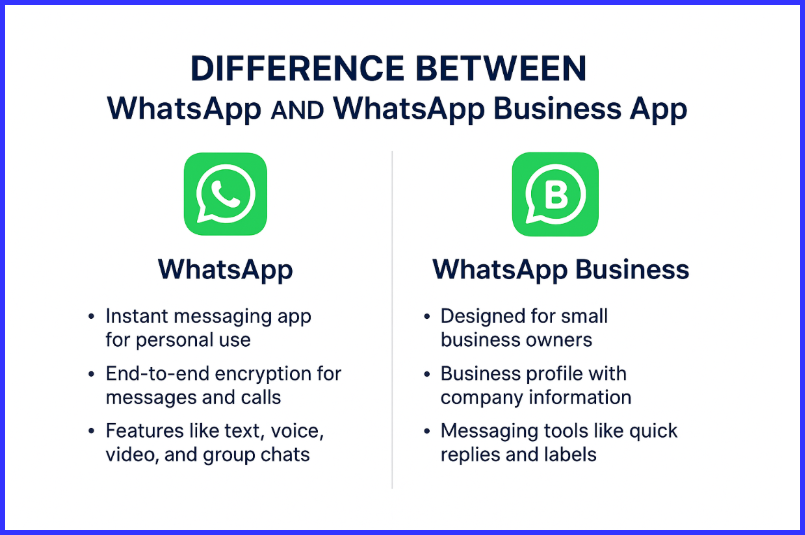
Difference Between WhatsApp and WhatsApp Business App lies mainly in their purpose, features, and the type of users they serve. WhatsApp is made for personal communication, while WhatsApp Business App is designed especially for businesses to connect with customers more professionally.
Both are free and look similar, but the Business version comes with extra tools like business profile setup, automated messages, product catalogs, and quick replies. In this article, we will clearly understand the difference between WhatsApp and WhatsApp Business App, their features, benefits, limitations, and which one is right for you.
In today’s digital world, communication apps have become an important part of both personal and business life. WhatsApp is one of the most widely used messaging apps, connecting millions of people worldwide. But when businesses also started using WhatsApp to communicate with customers, it led to a need for more professional features. To meet this need, WhatsApp Business App was introduced.
The difference between WhatsApp and WhatsApp Business App is simple:
- WhatsApp is for personal use.
- WhatsApp Business App is for business communication and customer support.
However, this difference goes deeper when we compare features like messaging tools, profile design, automation, analytics, and multi-device usage. Let’s understand everything in detail.
What is WhatsApp?
WhatsApp is a free messaging application used to send text messages, images, videos, voice notes, and make calls. It focuses on personal communication with friends, family, and personal contacts.

It offers:
- End-to-end encryption
- Voice and video calling
- Group chats
- Status updates
- Sharing files and media
Purpose: Personal communication
Users: Individuals
What is WhatsApp Business App?
WhatsApp Business App is a separate version of WhatsApp created for small and medium-sized businesses. It helps businesses interact with customers more effectively, showcase products, set up business information, and manage customer messages professionally.
It includes features such as:
- Business profile setup
- Automated greeting, away and quick replies
- Labels to organize customers and messages
- Product or service catalog
- WhatsApp Business API (for advanced use and large companies)
Purpose: Business and customer support
Users: Shop owners, service providers, online sellers, startups, SMEs
Key Differences Between WhatsApp and WhatsApp Business App
| Feature | WhatsApp Business App | |
| Intended Use | Personal communication | Business communication |
| Profile Type | Personal profile with name and status | Business profile with logo, address, category, website, and description |
| Messaging Tools | Basic messaging only | Auto-reply, greeting message, away message, and quick replies |
| Customer Management | Not available | Labels to organize chats (New Customer, Order Completed, etc.) |
| Product Catalog | Not available | Available to showcase services/products |
| Messaging Statistics | Not available | Basic statistics on sent, delivered, and read messages |
| Multi-Device Support | Available | Available (with business account restrictions) |
| Verification Badge | No | Available for verified businesses (green tick) |
| Use Case | Friends & family | Customers & clients |
Detailed Explanation of Differences
1. Profile Setup
A WhatsApp personal profile only shows your name and status.
Whereas in WhatsApp Business App, a business profile displays:
- Business Name (cannot be changed later)
- Category of Business
- Business Address
- Business Hours
- Email & Website link
- Short description about what you offer
This helps customers trust your brand.
2. Messaging Features
WhatsApp Business App includes communication tools like:
- Greeting Messages: Auto-send welcome message to new customers
- Away Messages: Inform customers when you are not available
- Quick Replies: Save frequently used messages for instant response
This saves time and improves customer service.
3. Catalog Feature
One of the biggest advantages of WhatsApp Business App is the Catalog feature.
Businesses can display their products or services with:
- Product images
- Price
- Description
- Direct inquiry button
This works like a mini online store inside WhatsApp.
4. Organizational Tools
WhatsApp Business App allows you to label chats, for example:
- New Order
- Pending Payment
- Delivered
- Regular Customer
This is very useful for managing multiple customers.
5. Messaging Statistics
WhatsApp Business App provides basic message analytics including:
- Number of messages sent
- Delivered
- Read
- Received
This helps businesses understand customer engagement.
6. Business API Support
WhatsApp Business also has WhatsApp Business API, used by medium and large companies for large-scale customer support, OTP sending, and automated system messaging. However, API setup requires technical support and is not free.
Pros and Cons
Advantages of WhatsApp
- Easy to use
- Free and widely available
- Fast communication
- Secure end-to-end encryption
Disadvantages of WhatsApp
- Not suitable for business
- No automation
- No product catalog
Advantages of WhatsApp Business App
- Creates a professional business presence
- Saves time with automated responses
- Helps manage customer relationships
- Catalog enhances product visibility
- Helpful for online sellers and small shops
Disadvantages of WhatsApp Business App
- One business account per phone number
- Too many customers can be hard to manage without API
- Verification (green tick) is difficult to get
Which One Should You Use?
| If you are… | Use This App | Reason |
| An individual communicating with friends and family | Simple personal communication | |
| A small shop, freelancer, online seller | WhatsApp Business App | Shows product catalog + Quick communication with customers |
| Medium or large enterprise | WhatsApp Business API | For customer service automation and large-scale messaging |
Conclusion
The difference between WhatsApp and WhatsApp Business App mainly lies in their purpose and the tools they offer. WhatsApp is made for personal chatting while WhatsApp Business App helps businesses communicate professionally and efficiently. If you run any business — small or big — WhatsApp Business App provides more features to manage customers, increase trust, and promote your services.
Both apps are free and easy to use, so the right choice depends on your needs. If your messaging involves customers, orders, or product inquiries — switching to WhatsApp Business App is a smart move.
Frequently Asked Questions(FAQs)
WhatsApp Business allows companies to create a verified business profile, adding credibility and transparency. It lets brands share essential details such as their contact number, website, and business hours. Unlike the standard WhatsApp, it offers specialized tools like product catalogs, greeting messages, away messages, and quick replies — all designed to improve customer support and engagement.
Both WhatsApp and WhatsApp Business are equally secure, offering free messaging with end-to-end encryption.
However, when customers chat with a WhatsApp Business account, the privacy policy of that business applies after messages are received. WhatsApp also displays a notice informing users they are interacting with a business account, giving them the option to continue, block, or delete the contact.
Yes, it’s safe to use WhatsApp Business for personal communication, as both apps use the same encryption technology.
That said, the purpose of WhatsApp Business is professional communication. If you use it for personal chats, your contacts will see a message indicating that they’re messaging a business account.
Yes. You can use both apps on a single device if it supports dual SIM. Each app must be registered with a different phone number to work simultaneously.
No. Each number can be linked to only one WhatsApp account. If you register your existing number on WhatsApp Business, your personal WhatsApp account will automatically switch to a business profile.
Absolutely. The WhatsApp Business App is free to download and use on both Android and iOS devices. Sending messages through the app doesn’t incur any additional charges.
No. Sending a message to a WhatsApp Business account is completely free for users.
Yes, the migration process is simple and secure. While setting up WhatsApp Business, the app detects your existing number and gives you the option to use it. If you choose the same number, your personal account will be upgraded to a Business account — with your chat history preserved.
During setup, enter your business phone number and verify it using the SMS code or the “Call Me” option.
Note that only WhatsApp Business API accounts can receive the green verified badge, which confirms that WhatsApp has authenticated the business identity.
While the WhatsApp Business App is powerful for small businesses, it lacks some advanced features found in the Business API. Common limitations include:
-Not being fully GDPR-compliant.
-Only one user can manage chats — no chat transfer option.
=Limited automation capabilities.
-Inability to integrate with CRM or third-party tools for personalized, large-scale customer engagement.
Reference:
1. “WhatsApp.” Wikipedia. Wikipedia Foundation.
Read Next: