The main difference between Megabyte vs. Gigabyte is their data storage capacity. A megabyte (MB) is a smaller unit of digital information, while a gigabyte (GB) is a larger unit. In the decimal system commonly used for storage devices, 1 gigabyte equals 1,000 megabytes. In computing contexts that use binary units, 1 gibibyte (GiB) equals 1,024 mebibytes (MiB).
Understanding Megabyte vs. Gigabyte is important when comparing file sizes, computer memory, storage devices, mobile data, applications, photographs, videos, and other digital information.
Megabyte vs. Gigabyte Comparison Table
The table below highlights the major differences between Megabyte vs. Gigabyte.
| Feature | Megabyte (MB) | Gigabyte (GB) |
|---|---|---|
| Definition | A unit of digital information equal to 1,000,000 bytes in decimal notation. | A unit of digital information equal to 1,000,000,000 bytes in decimal notation. |
| Symbol | MB | GB |
| Size | Smaller unit | Larger unit |
| Decimal Conversion | 1 MB = 1,000,000 bytes | 1 GB = 1,000,000,000 bytes |
| Relationship | 1,000 MB = 1 GB | 1 GB = 1,000 MB |
| Binary Equivalent | 1 MiB = 1,048,576 bytes | 1 GiB = 1,073,741,824 bytes |
| Common Use | Smaller files, images, documents, and software downloads | Storage drives, videos, applications, and large files |
| Typical Example | A small image or PDF may be several MB | A movie, game, or software installation may occupy several GB |
| Storage Capacity | Relatively small | Relatively large |
| Abbreviation | MB | GB |
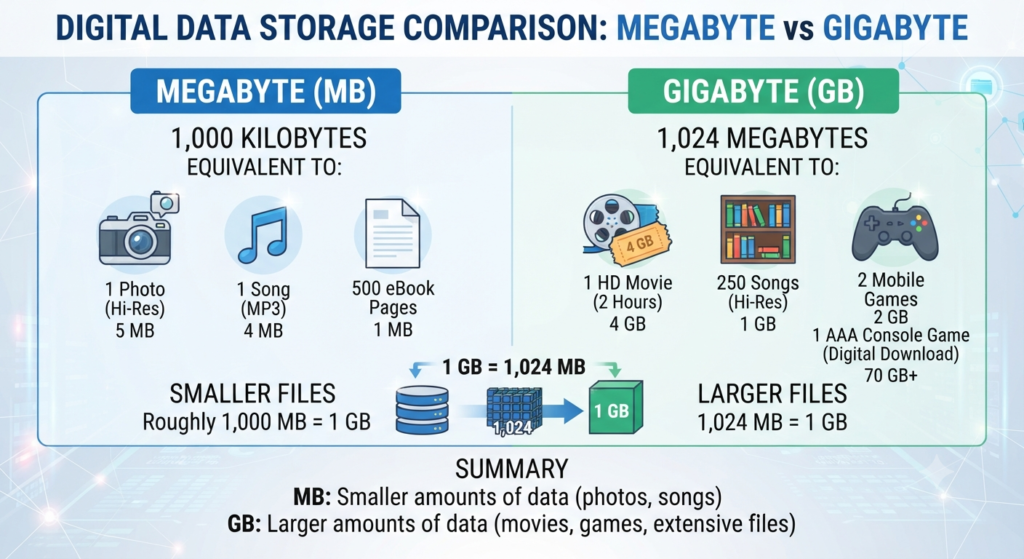
What Is a Megabyte?
A megabyte (MB) is a unit used to measure digital information and data storage. In the decimal system, one megabyte is equal to 1,000,000 bytes.
The prefix mega- represents one million in the decimal system. Therefore:
1 MB = 1,000,000 bytes
Megabytes are commonly used to describe the size of documents, photographs, audio files, software downloads, and other relatively small digital files.
For example, a photograph captured with a smartphone may occupy several megabytes depending on its resolution, image format, and compression. Similarly, a PDF document or text-based file may occupy only a few megabytes.
In binary computing terminology, the corresponding unit is the mebibyte (MiB):
1 MiB = 1,048,576 bytes
Although MB and MiB are technically different units, MB is frequently used in everyday discussions of digital storage and file sizes.
Characteristics of a Megabyte
Important characteristics of a megabyte include:
- Represented by the symbol MB.
- Used to measure digital data.
- Smaller than a gigabyte.
- Equal to 1,000,000 bytes in decimal notation.
- 1,000 MB equals 1 GB in decimal notation.
- Commonly used for photographs and documents.
- Used for smaller software downloads.
- Used to describe some audio files.
- Can be used to measure mobile data usage.
- Useful for describing relatively small digital files.
Examples of Megabytes
Examples of data that may commonly be measured in megabytes include:
- Text documents.
- PDF files.
- Digital photographs.
- Small audio files.
- Compressed images.
- Small software packages.
- Email attachments.
- Webpage resources.
- Mobile applications with relatively small installation sizes.
The actual size of a file depends on its format, compression, resolution, encoding, and other factors.
What Is a Gigabyte?
A gigabyte (GB) is a larger unit of digital information used to measure data and storage capacity. In the decimal system, one gigabyte equals 1,000,000,000 bytes.
The prefix giga- represents one billion in the decimal system.
Therefore:
1 GB = 1,000,000,000 bytes
Since:
1 GB = 1,000 MB
a gigabyte is substantially larger than a megabyte.
Gigabytes are commonly used to describe the capacity of hard drives, solid-state drives, memory cards, smartphones, tablets, and other digital storage devices. Large applications, high-resolution videos, computer games, and operating systems are also commonly measured in gigabytes.
The corresponding binary unit is the gibibyte (GiB):
1 GiB = 1,073,741,824 bytes
Thus, GB and GiB should not technically be treated as exactly the same unit.
Characteristics of a Gigabyte
Important characteristics of a gigabyte include:
- Represented by the symbol GB.
- Larger than a megabyte.
- Equal to 1,000,000,000 bytes in decimal notation.
- 1 GB equals 1,000 MB in decimal notation.
- Commonly used for storage capacity.
- Used to describe smartphone and computer storage.
- Used for large applications and software.
- Commonly used for video file sizes.
- Used for memory cards and external storage devices.
- Useful for describing large quantities of digital information.
Examples of Gigabytes
Examples of data commonly measured in gigabytes include:
- High-resolution video files.
- Computer games.
- Operating system installation files.
- Large software applications.
- Smartphone storage.
- Solid-state drives.
- Hard disk drives.
- Memory cards.
- Large collections of photographs.
- Large databases and digital archives.
For example, a storage device advertised as 256 GB provides much more storage capacity than one measured in only a few megabytes.
Megabyte vs. Gigabyte: Key Differences
1. Storage Capacity
The most important difference between Megabyte vs. Gigabyte is their capacity.
A megabyte represents a smaller quantity of digital information, whereas a gigabyte represents a much larger quantity.
In the decimal system:
1 GB = 1,000 MB
Therefore, a 1 GB file or storage capacity is equivalent to 1,000 MB.
2. Number of Bytes
Megabytes and gigabytes also differ in the number of bytes they represent.
In decimal notation:
1 MB = 1,000,000 bytes
1 GB = 1,000,000,000 bytes
Therefore, a gigabyte contains 1,000 times as many bytes as a megabyte.
3. Common Applications
Megabytes are generally used for relatively small digital files.
For example, photographs, documents, PDFs, and smaller audio files may be measured in MB.
Gigabytes are more commonly used for larger files and storage capacities.
Examples include:
- Computer storage
- Smartphone storage
- Video files
- Computer games
- Large applications
- Memory cards
4. File Size
File size is another important difference.
A simple document may occupy only a few megabytes, while a high-resolution video may occupy several gigabytes.
For example:
Small document → MB
Large video → GB
However, these are general examples rather than fixed rules because file size depends on the characteristics of the particular file.
5. Storage Devices
Storage devices are usually described using gigabytes or larger units.
For example, smartphones may have storage capacities such as:
- 64 GB
- 128 GB
- 256 GB
- 512 GB
A storage device with a capacity of only a few megabytes would be extremely small by modern standards.
Megabytes may instead be encountered when describing individual files stored on those devices.
6. Software and Applications
Software can be measured in either megabytes or gigabytes depending on its size.
A small utility program might require a few MB of storage, whereas a modern video game or professional software package may require tens or hundreds of GB.
Therefore:
Small software → Often measured in MB
Large software → Often measured in GB
7. Digital Images
Digital images can also be measured in megabytes or gigabytes.
An individual compressed photograph may be several MB. However, a large collection of high-resolution photographs can occupy several GB.
The actual file size depends on factors such as:
- Image resolution
- File format
- Compression
- Color depth
- Camera settings
8. Video Storage
Videos generally require considerably more storage than ordinary documents or compressed images.
Short, low-resolution videos may occupy hundreds of MB, while high-resolution or long-duration videos can occupy several GB or more.
Therefore, gigabytes are commonly used when discussing video storage.
9. Mobile Data
Megabytes and gigabytes are both commonly used to describe mobile or internet data usage.
For example, a small download might consume several MB, whereas streaming high-quality video or downloading large applications may consume several GB.
Mobile data plans are therefore often expressed in gigabytes.
10. Relationship Between the Units
The relationship between megabytes and gigabytes is straightforward in the decimal system:
1 GB = 1,000 MB
Therefore:
2 GB = 2,000 MB
5 GB = 5,000 MB
10 GB = 10,000 MB
Conversely:
1 MB = 0.001 GB
This relationship makes it easy to convert between the two units.
Similarities Between Megabytes and Gigabytes
Although megabytes and gigabytes differ in capacity, they share several characteristics.
Some major similarities include:
- Both are units of digital information.
- Both are used to describe file sizes.
- Both can be used to describe data storage.
- Both are commonly encountered in computing.
- Both are used for internet and mobile data measurements.
- Both are based on the byte as a fundamental unit.
- Both can describe digital files.
- Both can be converted into other data units.
- Both are used in computer and smartphone environments.
- Both are larger than a kilobyte when using the decimal SI-style sequence.
Decimal vs. Binary Measurement
One source of confusion when comparing Megabyte vs. Gigabyte is the difference between decimal and binary measurements.
In the decimal system:
1 MB = 1,000,000 bytes
1 GB = 1,000,000,000 bytes
Therefore:
1 GB = 1,000 MB
In the binary system, the corresponding standardized units are mebibytes and gibibytes:
1 MiB = 1,048,576 bytes
1 GiB = 1,073,741,824 bytes
Therefore:
1 GiB = 1,024 MiB
This distinction is particularly relevant when interpreting computer operating-system displays and storage-device specifications.
Which Is Larger—Megabyte or Gigabyte?
A gigabyte is larger than a megabyte.
In decimal measurement:
1 GB = 1,000 MB
Therefore, if you compare 1 MB with 1 GB, the gigabyte represents 1,000 times more data.
For example:
1 MB < 1 GB
100 MB < 1 GB
500 MB < 1 GB
1,000 MB = 1 GB
This makes the gigabyte the more appropriate unit for describing larger storage capacities and files.
When Should You Use Megabytes and Gigabytes?
The appropriate unit depends mainly on the size of the data being measured.
Use megabytes when discussing:
- Small documents
- Individual photographs
- Small audio files
- Small downloads
- Email attachments
- Smaller applications
Use gigabytes when discussing:
- Smartphone storage
- Computer storage
- Large video files
- Computer games
- Large applications
- Memory cards
- SSDs and hard drives
- Large data collections
Thus, the choice of unit is mainly based on convenience and the scale of the data.
Conclusion
The comparison of Megabyte vs. Gigabyte shows that both are important units for measuring digital information, but they represent different quantities of data. A megabyte is a smaller unit, while a gigabyte is a substantially larger unit.
In the decimal system, 1 gigabyte equals 1,000 megabytes, while the corresponding binary units are gibibyte (GiB) and mebibyte (MiB), with 1 GiB equal to 1,024 MiB.
Megabytes are commonly used for smaller files such as documents, photographs, and smaller downloads. Gigabytes are generally used for larger files, applications, videos, computer storage, smartphone storage, and memory cards.
Understanding Megabyte vs. Gigabyte makes it easier to compare file sizes, understand storage capacities, and interpret digital data measurements accurately.
Frequently Asked Questions (FAQs)
The main difference between Megabyte vs. Gigabyte is their size. A gigabyte is larger than a megabyte. In the decimal system, 1 GB equals 1,000 MB.
In the decimal system, 1 gigabyte contains 1,000 megabytes.
Yes. 1 GB is 1,000 times larger than 1 MB in the decimal system.
Gigabytes are commonly used to measure storage capacities, large applications, computer games, videos, smartphone storage, memory cards, SSDs, and hard drives.
Megabytes are commonly used to measure smaller digital files, such as documents, photographs, PDFs, audio files, and small software downloads.
Read Next: