The main difference between Gigabyte vs. Terabyte is their capacity for measuring digital data. A gigabyte (GB) is a smaller unit of digital storage, while a terabyte (TB) is a much larger unit. One terabyte is equal to 1,000 gigabytes when decimal storage units are used. Therefore, terabytes are commonly used to describe the capacity of large hard drives, SSDs, servers, and other storage devices, while gigabytes are often used for smaller storage capacities, files, memory, and applications.
Understanding Gigabyte vs. Terabyte is important when comparing storage devices, computer memory, cloud storage plans, smartphones, hard drives, and other digital systems. Knowing the relationship between these units makes it easier to determine how much data a storage device can hold.
Gigabyte vs. Terabyte Comparison Table
The table below highlights the major differences between Gigabyte vs. Terabyte.
| Feature | Gigabyte (GB) | Terabyte (TB) |
|---|---|---|
| Definition | A unit used to measure digital data or storage capacity. | A larger unit used to measure digital data or storage capacity. |
| Symbol | GB | TB |
| Relative Size | Smaller | Larger |
| Decimal Conversion | 1 GB = 1,000 MB | 1 TB = 1,000 GB |
| Binary Relationship | 1 GiB = 1,024 MiB | 1 TiB = 1,024 GiB |
| Typical Use | Files, applications, RAM, smaller storage devices | Hard drives, SSDs, servers, backups, and large storage systems |
| Storage Capacity | Suitable for relatively smaller amounts of data | Suitable for very large amounts of data |
| Example | A 128 GB smartphone | A 2 TB external hard drive |
| Data Scale | Lower | Much higher |
| Relationship | 1,000 GB = 1 TB | 1 TB = 1,000 GB |
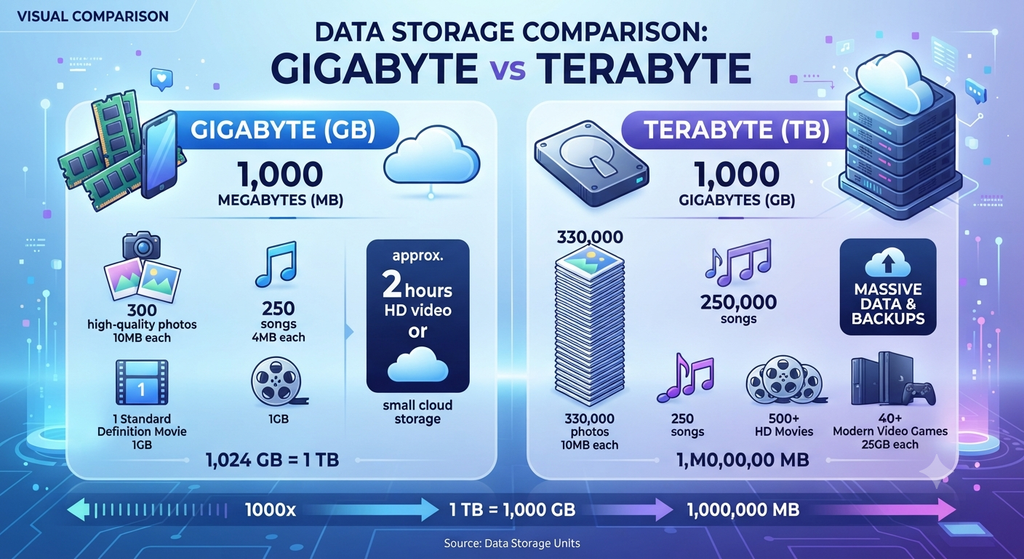
What Is a Gigabyte?
A gigabyte (GB) is a unit used to measure digital information and storage capacity. It is commonly used for describing the size of computer files, applications, smartphone storage, memory, and smaller storage devices.
In the decimal system commonly used by storage manufacturers:
1 gigabyte = 1,000 megabytes
Therefore:
1 GB = 1,000 MB
A gigabyte can represent a relatively large amount of digital information. For example, a high-quality photograph may occupy several megabytes, while a large application or video file can occupy several gigabytes.
The gigabyte is especially common in everyday computing because many consumer devices have storage capacities measured in tens, hundreds, or several hundred gigabytes.
Characteristics of a Gigabyte
A gigabyte has several important characteristics:
- Its symbol is GB.
- It is larger than a megabyte.
- It is smaller than a terabyte.
- One decimal gigabyte contains 1,000 megabytes.
- It is commonly used to describe file sizes.
- It is commonly used for smartphone and computer storage.
- It can be used to describe RAM capacity.
- It is frequently used for application and game sizes.
- It is useful for measuring moderate amounts of digital information.
- Multiple gigabytes make up a terabyte.
Examples of Gigabytes
Examples of data commonly measured in gigabytes include:
- Smartphone storage such as 64 GB or 128 GB.
- Computer storage such as 256 GB or 512 GB.
- Large software applications.
- Computer games.
- High-resolution video files.
- Collections of photographs.
- Operating system installation files.
- Cloud storage plans.
What Is a Terabyte?
A terabyte (TB) is a much larger unit of digital information and storage capacity than a gigabyte. It is commonly used for hard drives, solid-state drives, network storage systems, servers, backup systems, and large cloud storage plans.
Using the decimal system:
1 terabyte = 1,000 gigabytes
Therefore:
1 TB = 1,000 GB
For example, a 2 TB storage device can provide approximately 2,000 GB of decimal storage capacity.
Terabytes are particularly useful when describing large amounts of digital information because modern computers, organizations, and data centers can store enormous quantities of files, databases, videos, images, and backups.
Characteristics of a Terabyte
Important characteristics of a terabyte include:
- Its symbol is TB.
- It is larger than a gigabyte.
- One decimal terabyte equals 1,000 gigabytes.
- It is commonly used for large storage devices.
- It is used for servers and data centers.
- It is useful for large backup systems.
- It can store thousands of gigabytes of information.
- It is commonly used for high-capacity HDDs and SSDs.
- It is useful for storing large collections of multimedia files.
- Multiple terabytes are commonly used in professional storage systems.
Examples of Terabytes
Examples of storage capacities measured in terabytes include:
- 1 TB external hard drive.
- 2 TB solid-state drive.
- 4 TB backup drive.
- 8 TB network-attached storage system.
- Large enterprise databases.
- Video surveillance storage systems.
- Data-center storage systems.
- Large cloud storage environments.
Gigabyte vs. Terabyte: Key Differences
1. Size
The most important difference between Gigabyte vs. Terabyte is their size.
A gigabyte is a smaller unit of digital information, whereas a terabyte is significantly larger.
In the decimal system:
1 TB = 1,000 GB
Therefore, a 1 TB storage device has a capacity equivalent to 1,000 GB.
2. Storage Capacity
Gigabytes are commonly used to describe smaller or moderate storage capacities.
For example, smartphones, applications, computer games, and smaller SSDs may have their capacities expressed in gigabytes.
Terabytes are generally used for much larger storage systems.
For example, external hard drives, NAS systems, servers, and backup drives are often available with capacities of 1 TB, 2 TB, 4 TB, 8 TB, or more.
3. Unit Symbol
The symbols are another simple difference.
Gigabyte is abbreviated as:
GB
Terabyte is abbreviated as:
TB
The capital letters are important because digital storage units use standardized abbreviations.
4. Conversion
The relationship between the two units is straightforward in decimal notation.
1 TB = 1,000 GB
Therefore:
2 TB = 2,000 GB
4 TB = 4,000 GB
10 TB = 10,000 GB
Similarly:
500 GB = 0.5 TB
This conversion helps when comparing storage devices with different capacity ratings.
5. Common Applications
Gigabytes and terabytes are used in different situations.
Gigabytes are commonly used for:
- Smartphone storage
- Laptop storage
- Software
- Games
- Photographs
- Videos
- Documents
- RAM capacity
Terabytes are commonly used for:
- External hard drives
- High-capacity SSDs
- Servers
- Network storage
- Enterprise databases
- Backup systems
- Video surveillance
- Cloud storage
6. Amount of Data Stored
The amount of information that can be stored is another major difference.
A gigabyte can store a substantial amount of information, but a terabyte can store approximately 1,000 times as much decimal data.
For example, if a particular collection of files occupies 100 GB, approximately 10 such collections would occupy 1 TB.
7. Use in Personal Computing
Gigabytes are very common in personal computing.
A computer may have:
- 8 GB RAM
- 16 GB RAM
- 256 GB SSD
- 512 GB SSD
However, users who store large video collections, photographs, games, or backups may require terabytes of storage.
A 2 TB or 4 TB drive can provide considerably more capacity than a typical gigabyte-scale drive.
8. Use in Data Centers
Terabytes are particularly important in professional computing environments.
Businesses may need to store databases, customer records, application data, backups, surveillance footage, and other large datasets.
As the amount of information grows, storage capacity may move from gigabytes to terabytes and eventually to petabytes.
9. Difference in Practical Scale
The difference can be understood using a simple relationship:
Gigabyte → Smaller storage unit
Terabyte → Larger storage unit
Since:
1 TB = 1,000 GB
a terabyte represents a much larger storage capacity.
Gigabyte vs. Terabyte: Conversion Examples
The following examples make the relationship between the two units easier to understand.
Example 1: Gigabytes to Terabytes
Suppose a storage device has a capacity of 3,000 GB.
Using:
1 TB = 1,000 GB
Therefore:
So, 3,000 GB is equal to 3 TB in decimal notation.
Example 2: Terabytes to Gigabytes
Suppose an external hard drive has a capacity of 5 TB.
Then:
Therefore, 5 TB equals 5,000 GB in decimal notation.
Example 3: 500 GB to Terabytes
A 500 GB drive can be converted as follows:
Therefore:
500 GB = 0.5 TB
Decimal vs. Binary Storage Units
An important point when discussing Gigabyte vs. Terabyte is that decimal and binary units are not exactly the same.
Storage manufacturers generally use decimal units:
1 GB = 1,000 MB
1 TB = 1,000 GB
Computing systems may also use binary-based units, which have specific names:
1 GiB = 1,024 MiB
1 TiB = 1,024 GiB
The binary units are technically called gibibyte (GiB) and tebibyte (TiB).
Therefore, gigabyte and gibibyte should not be treated as exactly identical units.
This distinction can sometimes explain why the usable capacity displayed by an operating system appears slightly different from the advertised capacity of a storage device.
Gigabyte vs. Terabyte: Similarities
Although gigabytes and terabytes represent different quantities of data, they share several characteristics.
Some major similarities include:
- Both are units of digital information.
- Both can measure storage capacity.
- Both are used in computing.
- Both can describe file sizes.
- Both are used for digital storage devices.
- Both can be used in cloud storage.
- Both can be used to describe large datasets.
- Both are based on multiples of the byte.
- Both are commonly encountered in modern technology.
- Both help users compare digital storage capacity.
Factors to Consider When Choosing Gigabytes or Terabytes
The appropriate storage capacity depends on how much data you need to store.
1. Type of Files
Documents generally require relatively little storage, while high-resolution videos, games, and large databases can require substantially more space.
If you primarily store documents and photographs, a gigabyte-scale device may be sufficient.
For extensive video collections or backups, a terabyte-scale device may be more appropriate.
2. Number of Files
The number of files also affects storage requirements.
A small collection of files may fit comfortably within hundreds of gigabytes. Thousands or millions of files may require several terabytes.
3. Video Resolution
High-resolution video requires considerable storage space.
4K and higher-resolution video files can quickly consume hundreds of gigabytes or several terabytes, especially when storing large collections.
4. Backup Requirements
Backup systems often require substantial storage capacity because they may contain multiple copies or versions of important files.
For this reason, terabyte-scale storage is common for comprehensive computer backups.
5. Future Storage Needs
It is useful to consider future requirements when purchasing storage.
A device that provides enough space today may become inadequate as applications, media libraries, and files grow.
Choosing a larger capacity, such as 1 TB, 2 TB, or more, can provide additional room for future data.
Which Is Better—Gigabyte or Terabyte?
Neither gigabyte nor terabyte is inherently better. The appropriate unit depends on the amount of storage required.
Choose gigabytes when:
- You need moderate storage capacity.
- You are storing documents and photographs.
- You need storage for applications.
- You are comparing smartphone storage.
- You have relatively small data requirements.
Choose terabytes when:
- You need large storage capacity.
- You store extensive video collections.
- You perform large-scale backups.
- You manage large databases.
- You need storage for servers or NAS systems.
- You work with large datasets.
For example, a 128 GB smartphone may be adequate for a user with modest storage requirements, while a professional working with large video files may benefit from several terabytes of storage.
Conclusion
The comparison of Gigabyte vs. Terabyte shows that both are units used to measure digital information and storage capacity, but they represent very different amounts of data. A gigabyte is a smaller unit, while a terabyte is a much larger unit.
In the decimal storage system, 1 terabyte equals 1,000 gigabytes. Gigabytes are commonly used for smartphone storage, applications, files, and smaller computer storage devices, whereas terabytes are commonly used for large hard drives, SSDs, servers, backups, and data-storage systems.
Understanding Gigabyte vs. Terabyte helps users make better decisions when selecting storage devices and estimating how much digital information they can store. The key relationship to remember is simple:
1 TB = 1,000 GB
Frequently Asked Questions (FAQs)
The main difference between Gigabyte vs. Terabyte is their size. A gigabyte is smaller, while a terabyte is larger. In decimal notation, 1 terabyte equals 1,000 gigabytes.
There are 1,000 gigabytes in 1 terabyte when using the decimal system commonly used for storage-device capacities.
Yes. 1 TB is much larger than 1 GB. Specifically, 1 TB equals 1,000 GB in decimal notation.
Yes. Using decimal units, 500 GB equals 0.5 TB.
Gigabytes are commonly used to measure smartphone storage, computer storage, application sizes, games, photographs, videos, and other digital files.
Read Next: